

Description
Download Nokia PC Phone – manage mobile phone, SMS from PC, call from browser, Firefox extension, contact manager
Overview
Nokia PC Phone is a Firefox extension developed by Nokia, designed to bridge the gap between mobile and desktop environments by enabling users to manage their mobile phones directly from their web browser. Released on December 14, 2007, the tool was introduced during a period when mobile device integration with personal computers was still in its early stages. Its primary purpose is to simplify mobile communication tasks—such as sending SMS messages, making calls, and managing contacts—without requiring users to switch between devices. This makes it particularly useful for individuals who spend significant time on their computers and wish to maintain seamless communication workflows.
The application targets users who rely heavily on both their mobile phones and desktop systems, especially professionals, remote workers, and tech-savvy individuals seeking efficient multitasking tools. By leveraging the familiar Firefox interface, Nokia PC Phone reduces the learning curve typically associated with new software. It allows users to send text messages, initiate calls, and update contact details from their computer, minimizing interruptions during work sessions. While the developer did not provide additional technical details about the extension’s backend or connectivity protocols, its functionality suggests a direct integration between the browser and compatible Nokia mobile devices.
Within the broader app ecosystem of the mid-2000s, Nokia PC Phone stood out as an early attempt at cross-device synchronization. Though limited in scope by today’s standards, it represented a forward-thinking approach to user-centric design. The tool reflects Nokia’s commitment to enhancing user experience beyond the physical device, emphasizing accessibility and convenience. Despite its age, the extension remains notable for its pioneering role in integrating mobile functions into the desktop environment.
Key Features & Functionality
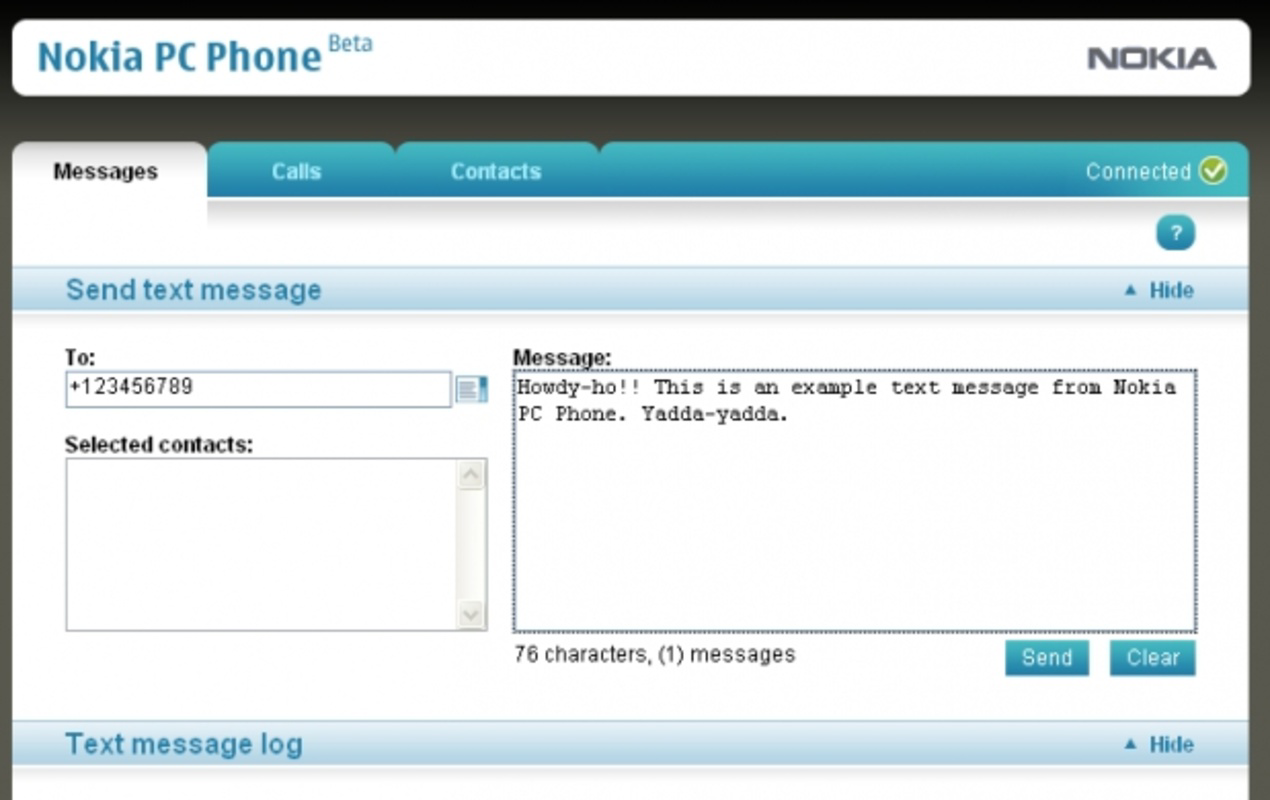
- SMS Message Manager: Users can compose, send, and receive text messages directly from the Firefox browser. This feature allows for efficient communication without picking up a mobile device, ideal for users managing multiple conversations while working on their computer.
- Calling System: The extension includes a built-in calling interface that enables users to place phone calls through their mobile device via the browser. This eliminates the need to switch between devices, offering a convenient solution for multitaskers.
- Contact Management: Users can view, edit, and organize contact information from their mobile phone’s address book through the browser. This feature supports real-time updates and helps maintain accurate contact records across devices.
- User-Friendly Interface: Built on the Firefox platform, the extension uses a clean, intuitive layout that mirrors standard browser navigation. This ensures minimal friction for users unfamiliar with specialized mobile management tools.
For example, a remote worker can reply to a client’s text message while drafting an email, or a student can schedule a call with a classmate without interrupting their research. These use cases demonstrate how the extension enhances productivity by consolidating communication tools into a single, accessible environment. Although the developer did not list formal performance metrics, the extension’s lightweight design—only 2.5 MB in size—suggests it operates efficiently without consuming significant system resources.
Interface, UX & Performance
The user interface of Nokia PC Phone is designed around the Firefox browser environment, utilizing standard web elements such as pop-up panels, tabs, and input fields. The layout is minimalistic, focusing on core functions like message composition, call initiation, and contact editing. Navigation is straightforward, relying on browser-based menus and buttons that are consistent with Firefox’s overall design language. This approach ensures that users do not need to learn a new interface, reducing cognitive load and improving usability across different skill levels.
Responsiveness is a key strength of the extension, as it operates in real time with the connected mobile device. Users can expect immediate feedback when sending messages or placing calls, assuming a stable connection between the PC and phone. However, the developer did not specify minimum OS requirements or compatibility with modern Firefox versions, which may affect performance on updated systems. Although the developer did not list formal performance metrics, the extension’s small file size suggests it is optimized for low-resource environments.
Stability appears to be a reliable aspect, given the extension’s long-standing presence in the Firefox ecosystem. However, users on current operating systems may encounter compatibility issues due to changes in browser architecture and security policies. The lack of recent updates or official support documentation further limits confidence in long-term functionality. Nonetheless, the interface remains accessible and functional for users who can successfully install and run the extension on their system.
Platform Compatibility & Technical Requirements
Nokia PC Phone is designed to run on the Firefox web browser. The application is compatible with systems that support Firefox, though the developer did not specify minimum OS requirements or version compatibility. The extension has a file size of 2.5 MB, indicating a lightweight footprint that should not significantly impact system performance. It is available as a free download, with no additional cost for installation or use.
Given its release date of December 14, 2007, the extension was originally built for older versions of Firefox and earlier operating systems. As modern browsers have evolved in terms of security, API access, and extension architecture, compatibility with current Firefox versions cannot be guaranteed. The developer did not provide information about required system specifications, update frequency, or support for mobile platforms beyond the browser interface.
Pros and Cons
Pros
- Enables SMS management and calling directly from the browser.
- Intuitive interface based on the familiar Firefox environment.
- Lightweight design with a small file size (2.5 MB).
- Free to download and use.
- Supports contact management from a PC.
Cons
- Compatibility with modern Firefox versions is uncertain.
- Developer did not list minimum OS or browser requirements.
- No recent updates or official support since release.
- May not function on current operating systems due to outdated architecture.
- Limited to Firefox and not available on other browsers.
FAQ
Is Nokia PC Phone still compatible with current Firefox versions?
The developer did not provide information about compatibility with modern Firefox versions. Given its release date in 2007, it may not function properly on current browser builds due to changes in extension architecture and security policies.
Can I use Nokia PC Phone on macOS or Windows?
The extension is designed for Firefox, which runs on both macOS and Windows. However, the developer did not specify minimum OS requirements or confirm compatibility with current operating systems.
Is Nokia PC Phone safe to download and install?
The app is free and distributed through the Firefox Add-ons platform. While no security vulnerabilities were reported in its original release, users should exercise caution when installing legacy extensions on modern systems due to potential compatibility and security risks.
Does Nokia PC Phone require a specific Nokia phone model?
The extension was designed to work with compatible Nokia mobile devices, but the developer did not list specific models or connectivity requirements. Users may need to ensure their phone supports the necessary pairing protocol.
How do I update Nokia PC Phone?
The developer did not provide update information or a dedicated update mechanism. As the extension was released in 2007, it is unlikely to receive official updates or patches.
Final Thoughts
Nokia PC Phone remains a historically significant tool in the evolution of cross-device communication. Though developed over a decade ago, its core concept—managing mobile functions from a desktop browser—continues to influence modern solutions. For users with older systems and compatible Nokia phones, it may still offer functional value, particularly in scenarios where multitasking between phone and computer is essential.
However, due to its age and lack of modern support, it is not recommended for users seeking a reliable, secure, and up-to-date solution. The extension’s lightweight design and free access are notable advantages, but compatibility limitations and absence of updates significantly reduce its practicality today.
For those interested in legacy tools or exploring early attempts at mobile-desktop integration, Nokia PC Phone presents a fascinating glimpse into past innovation. Download Nokia PC Phone now and experience a pioneering step in mobile communication history.
Guides & Tutorials for Nokia PC Phone
How to install Nokia PC Phone
- Click the Preview / Download button above.
- Once redirected, accept the terms and click Install.
- Wait for the Nokia PC Phone download to finish on your device.
How to use Nokia PC Phone
This software is primarily used for its core features described above. Open the app after installation to explore its capabilities.
User Reviews for Nokia PC Phone 0
No reviews found


